


Smart homes are brilliant. Your lights listen to you, your thermostat thinks ahead, and your doorbell shows visitors while you’re still in bed. Unfortunately, hackers love smart homes almost as much as homeowners do.
Every connected bulb, speaker, camera, or appliance is another potential entry point. A secure smart home network is no longer optional, it’s essential. The good news is that protecting your home does not require a computer science degree or a panic induced unplugging of everything.
In this guide, you’ll learn practical, real world smart home security tips that actually work. We’ll cover home Wi-Fi security basics, router settings, IoT device protection, network segmentation, and how to create a smart home setup that hackers would rather avoid entirely.
Think of this as turning your smart home from an open café Wi-Fi into a private, guarded residence.
Why smart homes are attractive targets for hackers
Hackers don’t break into smart homes just to mess with your lights. They’re usually after data, access, or leverage.
Smart devices often collect:
- Login credentials
- Voice recordings
- Camera footage
- Daily routines and habits
- Network access to other devices
Many IoT devices are designed for convenience, not security. Weak passwords, outdated firmware, and poor encryption make them easy targets. Once one device is compromised, the entire home network can become exposed.
This is why securing your smart home network needs a layered approach. No single fix works on its own.
Start with your Wi-Fi router, the heart of your smart home
Your router is the front door of your digital home. If it’s weak, everything behind it is vulnerable.
Learning how to secure home Wi-Fi router settings properly is the most important step you can take.
Change default login credentials immediately
If your router still uses the default username and password printed on the box, hackers already know it.
Do this immediately:
- Create a unique admin username
- Use a long, complex password
- Store it in a password manager
Avoid using personal details or common phrases. A good password should feel annoying to type.
Use modern Wi-Fi encryption
Older encryption standards are outdated and insecure.
Your router should use:
- WPA3 if available
- WPA2 as a minimum
Avoid WEP or WPA at all costs. These are easily cracked and no longer considered safe.
Disable remote management unless you truly need it
Remote access lets you manage your router from anywhere, but it also gives hackers another door to try.
If you don’t absolutely need remote management:
- Turn it off
- Access your router only from your local network
This single change can dramatically reduce risk.
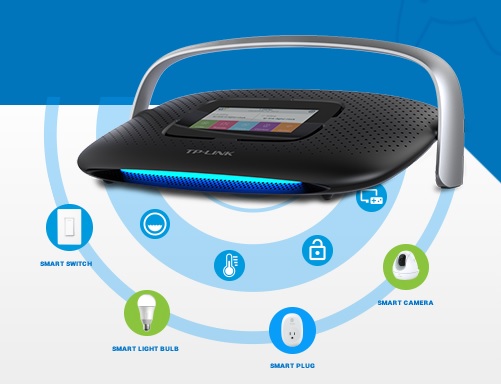
Keep your router firmware up to date
Router updates aren’t exciting, but they matter.
Firmware updates often:
- Patch security vulnerabilities
- Improve firewall protection
- Fix bugs hackers exploit
Check for updates every few months, or enable automatic updates if your router supports them.
If your router no longer receives updates, it may be time for an upgrade. An outdated router is like a lock that never gets repaired.
Use the best security settings for smart home router
Modern routers include powerful security features that many people never turn on.
Look for and enable:
- Built in firewall protection
- Intrusion detection or prevention systems
- Automatic device monitoring
- Encrypted DNS if available
Some routers also offer companion apps that make managing security far easier than logging into a web interface.
This is where the best security settings for smart home router setups really shine.
Create a separate guest network for smart devices
This is one of the most effective smart home security tips, and it’s surprisingly easy.
A guest network for smart devices keeps your IoT gadgets separate from your main devices like phones and laptops.
Why this matters
If a smart plug or camera is compromised:
- Hackers can’t access your personal devices
- Sensitive data stays isolated
- Damage is contained
Think of it as putting your smart devices in a separate room with limited access.
How to set it up
Most routers allow you to:
- Create a guest network
- Disable device to device communication
- Set a strong password
Connect all smart home devices to this network, not your main one.
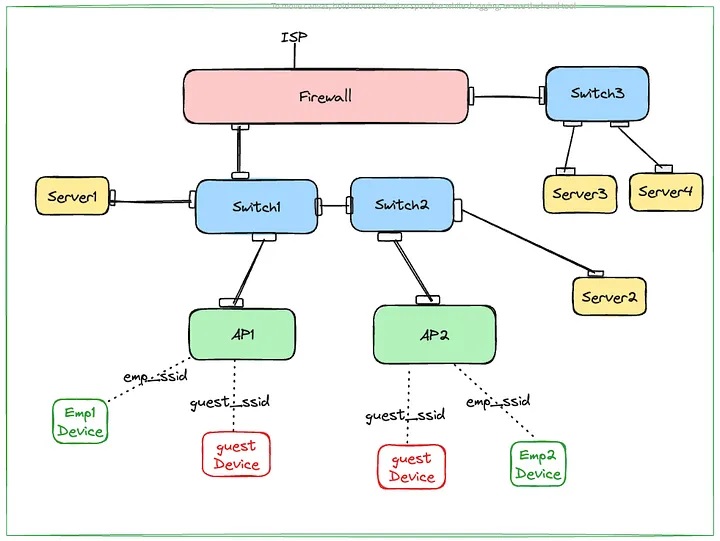
Use network segmentation for smart home setups
For larger or more advanced smart homes, network segmentation for smart home security takes things even further.
Segmentation divides your network into multiple zones:
- Personal devices
- Smart home devices
- Work devices
- Guest access
Each segment has its own rules and restrictions.
This approach:
- Limits lateral movement for hackers
- Reduces risk if one segment is breached
- Improves overall control
Mesh systems and advanced routers often support VLANs or device grouping that makes segmentation easier than it sounds.
Secure IoT devices in smart home environments
Smart devices are often the weakest link. Many ship with minimal security and depend entirely on you to lock them down.
Change default device passwords
Just like routers, IoT devices often ship with default credentials.
Always:
- Change default passwords
- Use unique passwords per device
- Avoid reusing router or email passwords
Yes, it’s annoying. No, it’s not optional.
Disable unused features
If your smart device supports:
- Remote access
- Voice purchasing
- Data sharing
Turn off anything you don’t actively use. Less functionality means fewer attack surfaces.
Keep device firmware updated
Manufacturers release updates to fix vulnerabilities, but many devices don’t update automatically.
Make it a habit to:
- Check device apps monthly
- Enable auto updates when possible
- Replace devices that stop receiving support

Use strong passwords and a password manager
Password reuse is one of the biggest security mistakes in smart homes.
Best practices include:
- Unique passwords for every device and account
- Passwords longer than 12 characters
- Random combinations of letters, numbers, and symbols
A password manager removes the headache and improves security at the same time.
Enable two factor authentication wherever possible
Many smart home platforms now support two factor authentication.
This means:
- Even if a password is stolen
- Hackers still need a second verification step
Enable it on:
- Smart home hubs
- Cloud dashboards
- Manufacturer accounts
It’s one of the simplest ways to dramatically reduce risk.
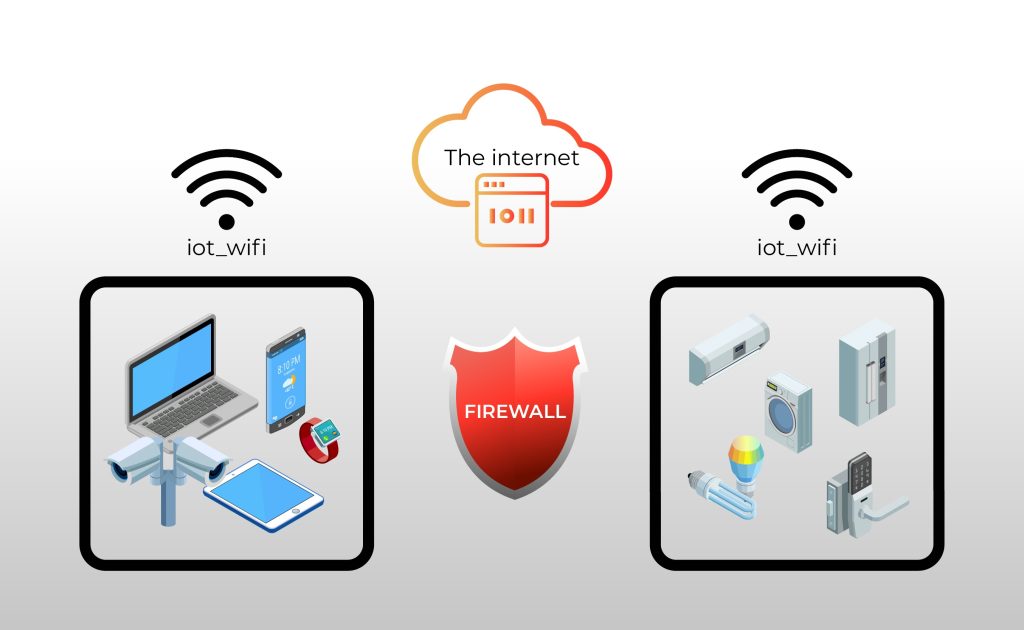
Install a home network firewall and antivirus solution
Home network firewall and antivirus tools are no longer just for businesses.
Modern solutions can:
- Monitor all connected devices
- Block suspicious traffic
- Alert you to unusual behavior
Some routers include these features natively. Others integrate with security subscriptions.
This layer acts like a security guard watching traffic in real time.
Monitor your network regularly
Security isn’t a one time setup. It’s an ongoing habit.
At least once a month:
- Review connected devices
- Remove anything unfamiliar
- Check for firmware updates
If your router shows traffic spikes at odd hours, investigate.
Awareness alone prevents many breaches.
Secure voice assistants and smart speakers
Voice assistants are convenient, but they also listen a lot.
To reduce risk:
- Disable voice purchasing
- Review stored voice recordings
- Mute microphones when not in use
- Restrict access to personal data
Treat voice assistants like shared computers, not private diaries.
Be careful with third party integrations
Smart home ecosystems often integrate with dozens of third party services.
Before connecting anything:
- Check what permissions are requested
- Remove unused integrations
- Avoid unknown developers
Every integration adds another potential vulnerability.
Protect physical access to your devices
Not all attacks are remote.
If someone can physically access your devices:
- Reset buttons can be abused
- Credentials can be extracted
- Devices can be replaced
Secure hubs, routers, and cameras in locations that aren’t easily accessible to visitors.

What to do if you suspect your smart home is compromised
Signs of trouble include:
- Devices behaving erratically
- Unknown devices on your network
- Passwords suddenly not working
If this happens:
- Disconnect affected devices
- Change all passwords
- Update firmware
- Reset devices to factory settings if needed
Act fast. The sooner you respond, the less damage is done.
Final thoughts on securing your smart home network
A secure smart home network doesn’t happen by accident. It’s the result of good habits, smart setup choices, and occasional maintenance.
The goal isn’t perfection. It’s making your home a difficult, boring target. Hackers prefer easy wins. When faced with strong passwords, network segmentation, updated firmware, and proper Wi-Fi security, they usually move on.
Your smart home should work for you, not against you. With the right steps, convenience and security can coexist peacefully.
FAQs
Is a secure smart home network really necessary?
Yes. Smart homes store personal data and connect multiple devices to your network. Without proper security, a single vulnerable device can expose your entire home.
How often should I update my smart home devices?
Ideally once a month. Enable automatic updates wherever possible to ensure security patches are applied as soon as they’re released.
Can a guest network really improve security?
Yes. A guest network for smart devices keeps IoT gadgets separate from phones and computers, limiting damage if one device is compromised.
Do I need antivirus software for my home network?
While not mandatory, a home network firewall and antivirus solution adds an extra layer of protection by monitoring traffic and blocking suspicious activity.
Is upgrading my router worth it for security?
Absolutely. Modern routers offer stronger encryption, better monitoring tools, and improved protection features compared to older models.
